Monday, March 17, 2008

Why I haven't changed my language!

There was a very interesting question posted on TheServerSide, "What would make you change languages?" and for me the answer is simple, Tool Support. I have used Groovy and it was kinda neat, but content assist didn't work very well. Possibly because of some bugs or maybe the language is just too dynamic to fully support this feature. I have used JavaScript and 3 of us spent a 1/2 hour tracking down a extra character (we tried to call a method Foo=(arg1, arg2)), bad place to put an equal sign.

Back in my undergraduate days, life was simple. All I needed was vi and a command line. I was happy and I figured if you needed a tool to do your job then you were never going to be a "real" software engineer. Seven years later (and the Eclipse influence) this has changed. What does looking up a method signature somewhere really do for me? What does spending my time tracking down a runtime error that really should have been caught at compile time accomplish?

Sure, a lot of new languages have shorter syntax for common operations, all intended to save me a few keystrokes. Let's count:

var person = new Person; (about 15 keystrokes)
Person person = new Person(); (about 10 keystrokes)

See, with proper tool support I would use content assist and type P(content-assist) p(content-assist) = (content-assist) P(content-assist);[enter].

And it is not just content assist. It is refactoring, search, navigation, debugging, analysis and collaboration. It seems that some languages are easier to write tools for than others. Java and Javascript are almost the same age; why isn't there top notch tooling for Javascript (something like the JDT)?

I'll continue to try out new languages, but without excellent tool support, I'm not changing languages anytime soon.

Anyways, to each their own!

Friday, March 14, 2008

An Updated Design

Today I decided to use the CSS from my website for my blog. The new design should integrate my blog and my website a little more tightly. The update wasn't too hard to complete, but the CSS isn't pretty. Blogger seems to use some custom server side scripts to handle style and some of them weren't compatible with my existing CSS page. As well, I could not find a way to upload images as part of my template, so I am linking back to my main site for those.

Anyways it's done, and hopefully over the next few days I will get a chance to clean-up some of the code and remove the unneeded tags.

Friday, March 07, 2008

Small GWT / OSGi Problem

I thought I would document a small problem I had today in case others ran into the same issue.

If anyone has been to my website you know it's not that exciting. A few links, a picture or two and links to my blog. What is exciting (for me at least), is how I built it. My website is actually an OSGi engine (Equinox) with a Jetty bundle to serve up the pages, a small EMF model in the back end (to hold some links), and GWT to tie it all together. To be clear, this is overkill!!! But I enjoyed setting it up and I learned a bunch!

Now the problem. Today I decided to see if I could modify things on my site (both client and server side) and update it using the OSGi update command. (With P2 on its way this seems like a cool thing to do). However, after I did the update *BOOM* GWT died.

It turns out that GWT does some server side security checks and they use the classloader attached to the current thread to do them. However, this doesn't play very well with OSGi. To fix this I added:

Thread.currentThread().setContextClassLoader( MyActivator.getDefault().getClass().getClassLoader() );

This way, the same class loader that loaded my activator will be used when GWT does its security checks.

I'm not sure if this is the best way to fix this, so if anyone else has suggestions I'll try them out and let you know how they work. Also, I found this bug after I sorted all this out :).

Thursday, November 15, 2007

Eclipse and Web Technologies

The news yesterday by Denis regarding Babel is terrific. Globalizing Eclipse through a community driven approach seems so obvious, yet somehow so novel. However, the choice of technology (LAMP: Linux, Apache, MySQL, Php / Perl / Python) caught my eye. LAMP seems to be one of the most common application stacks (the Microsoft stack being the other one).


Where does OSGi / Java / Jetty (and possibly GWT, I call this J-JOG) fit in here? Is there a reason why this configuration is not even mentioned in the alternatives section on Wikipedia's Lamp article? Is there something fundamentally wrong with this setup (scalability, performance, stability) or is it simply a matter of preference?


This is not meant to start a flame war, and I am by no means questing the choice of technology, I'm honestly just curious.

Monday, October 15, 2007

Plug-in Dependency Clarification

I posted earlier today that I released a version of my plug-in development visualization tool. I was wrong is saying this, since the project is in incubation and the version was 0.1. What I really did was make Milestone 1 of my plug-in development visualization tool available.

It is important that I make this clarification since my work is has not been deeply reviewed yet. I'm sorry if this caused any confusion.

Plug-in Dependency Visualization... M1 Available!

I was finally able to make a version of my Plug-in Dependency Visualization tool available on an update site.

http://download.eclipse.org/eclipse/pde/incubator/visualization/site


Point your update manager there if you want to try it out. The tool works with Eclipse version 3.3 (Europa) and later. The tool is pretty easy to use, simply load the view (Visualizations->Graph Plug-in Dependencies), right-click on the canvas, select "Focus On..." and select the bundle you wish to see.

I also put together a New and Noteworthy to highlight some of the features. I am already getting some good feedback, including Eugene's suggestion to remove the control panel (and make the options available through context menu) and to add extension point information.

As I mentioned before I did this work as part of the Summer of Code project. It was a great experience and I can't thank Chris Aniszczyk enough for encouraging me to apply and mentoring me throughout the summer. Seriously Chris, if you are in B.C. skiing this winter let me know, I owe you a few frosty beverages.

As for the SoC program, it is a great opportunity! For all you students out there, it is never to early to start thinking about ideas and bouncing them off Eclipse developers. As I won't be a student next summer (my wife and daughter will disown me if I am still in school next year :D ) I won't be participating as a student, however, I hope to help out as a mentor. Wayne, when does that start?

Friday, August 17, 2007

Thanks!

With Wassim publicly announcing his departure from IBM and his reduced role on PDE, I thought I would use this opportunity to say a few thank-yous, and suggest a new award at EclipseCon.

I first started within with Eclipse in January 2003, and my first exposure was with GEF. It was part of my PhD research (that is *hopefully* almost finished :) ) and it was at IBM as a research student. Throughout my time working on / with Eclipse, numerous people helped me along. First is Wassim, who contacted me about building a graphical view for Plug-in Dependencies. Many-a-nights I would find him on-line asking him stupid questions like why does the PDE have 5 different models to represent Plug-ins. I'm not sure who I'm going to turn to now to help solve my confusion (I'm already hounding Mike and Brian of the PDE Team). The second person I need to thanks is Chris Aniszczyk. Chris is actually my Summer of Code mentor and I'm not sure if he knows *everything* about Eclipse, but he sure knows everyone! Chris is also knows everything about Eclipse process and can really help get things done. Finally, and maybe most importantly, is Ed Merks. Ed is my IBM research mentor and I still turn to him for real life advice (not to mention all my questions on the newsgroup that keep him busy).

With the departure of Wassim (and no he is not the first committer to leave), you start to realize the importance of junior developers and Eclipse up-and-comers. Eclipse thrives both because of its user base and developers, but what if one company decided to pull all its committers? In order to ensure Eclipse growth continues, it is important that new committers (both from existing member companies, and elsewhere) join the ship. This is why I would like to throw the idea our there of a mentorship award at EclipseCon. An award for the committer who goes out of their way to bring new committers on board?

Thoughts?

Good luck Wassim!

Thursday, August 16, 2007

PDE Dependency View (SoC)

It has been too long since my last update. I meant to post this early this week, so this isn't the latest code. I will do another update this weekend.

Anyways, I thought I would give a brief overview of what the PDE Viz tool looks like and how to use it (My SoC project). The PDE Viz Tool is targeted at developers trying to understand the dependencies of their bundles. Once you get the tool (currently only available in source, but that will change soon) from here, you can find it using the now famous CTRL-3 :)

Once loaded, you can right click on the canvas to select a bundle.

For this example I selected ecore.


Producing a nice little graph.
I have also added a few small analysis tools, so if you ever wondered why javax.servlet was needed by EMF, you could see the dependency path:

A few other small notables in this version. I have updated my labels to use gradient colours. Also, if you double click a node it will refocus the graph on that node. The arrow keys (at the top of the view) can be used to navigate forward and backwards through the graph. Finally, I added a "Screenshot" action so you can save your dependency graph to a PNG.

I have tested this on some of the large IDEs built on Eclipse and it worked (albeit a little slow). My hunch is that it was not slow because of the large number of nodes, but rather because of the even larger number of edges. But for all the bundles I tested in Europa it worked without problems.

Thursday, July 12, 2007

Node goes up... Node goes down...

Throughout the past week I have been focusing pretty steadily on my Summer of Code project. Last week I reported that container support had been added to Zest. Since then, I have been updating and fixing up many of the issues containers presented. There were a number of small changes that needed fixing (like the fact that my labels were all truncated), but I also managed to add a number of new features. In particular I added open close animations, and container layout and scaling. Now each container can have its own layout and scale depending on the number of nodes. I also reversed the direction of my gradient, although I really should work with the UI team and use the Kelvin Colours.


The most exciting feature I added was a new open / close algorithm. Now, when a container is opened, it moves the nodes below it out of the way. I attempt to put the nodes back when the container closes again. Moving nodes out of the way (without really altering the graph) is considered a pretty hard problem in graph drawing, but since I knew my nodes always grow downward, it made it somewhat easier for me.


Finally I added a fisheye feature. Now, if enabled, when you mouse over a small node you can have it zoom into focus. Using this technique, I chose only to show the icons on the small nodes, but on hover you get the full text. (In this screenshot I moved my mouse over the centre node in top container).


The snippet used to create these screenshots is less than 70 LoC (and if I was a more clever programmer I could probably do it in less than 40).

It was a pretty busy week with a lot of late nights and I haven't seen my wife and daughter much, so I think I will head home and enjoy the nice west coast weather we have been receiving.

Tuesday, July 03, 2007

Europa, My Top 10 List

I have had the pleasure of using Europa for the past 8-10 months. Of course it was not called Europa the entire time (Eclipse 3.3 Milestones with several milestone plug-ins attached). I have now come to depend on several of these new features and here is a list of my Top 10 Europa Features that I Cannot Live Without!!!

I should point out that I do a lot of Model Driven Software Development and Java Development, so if this list seems a little biased, it is :) There seems to be really good stuff going on in CDT, Birt, etc... but I have not used these tools enough to give them a fair review. I guess that's why this is My Top 10 List :)

Without further ado, my top 10:

10: Mylyn! A lot has been said about this, and yes it really does live up to all the hype!

9: GMF / MDT: Both of these are really cool technologies, but out of the box they also provide graphical editors for model development. One of the biggest criticisms of the modeling project was “I cannot see my model graphically”, well now you can!

8: New Look / Min-Max behaviour: Eclipse got a bit of a face lift with some new Editor Min / Max behaviour. This makes much better use of the screen real estate, while maintaining easy access to your favorite views through “Quick Views”. Press CTRL+M when coding, you'll enjoy the space.

7: The Eclipse Packaging Project: I still use Eclipse the “Old Fashion Way”, that is get the SDK, install the features I want, adjust the Eclipse startup parameters (memory use, file handles, etc..), but judging from some early download numbers, people have really enjoyed the pre-packaged Eclipse distributions. It is contributions like the EPP that answers the critics who said Open Source projects are cumbersome to setup and lack polish. I am definitely jumping on this bandwagon!

6: Plug-in XML and Manifest improvements: Several new features were added to the PDE to make plug-in development easier. This includes Content Assist, Hyperlink support, Code folding, and Code Formating. Also, the PDE now allows you run multiple version of the same plug-in in the workspace or target environment. These features echo Wassim's comments that PDE Does tooling, but our business is people!!

5: Printing on GTK+:This is just a great bug fix / feature addition. I should also point out that GTK+ support for Eclipse is amazing. I personally think it looks nicer than Windows and Eclipse runs as fast, if not faster on my Linux box than it does on my Windows one.

4: New PDE Forms: They really Brought Sexy Back with this one. As well as a form face lift (with new gradients, icons, section headers, etc...) field assist and field validation were added. If you don't know, these forms are not just for PDE, you can use them in your favorite SWT app too.

3: Save Actions: Every now and then you get a feature that you really hate, and this is one of them! Why? Because I can no longer sit at someone else's machine and use their version of Eclipse. I am entirely dependent on my save actions: to organize my imports, format my code, and update my brackets. In my opinion, this feature ranks up there with Automatic Builds!

2: CTRL+Awesome: CTRL+3 is the new CTRL+1, that is, the new hot key I cannot live without. I no longer have to remember where I saw that action, or even what actions are available. Every view, perspective, menu item and editor are instantly available with a push of a button (CTRL+3).

1: EMF Generics: The EMF Team really out did themselves with this one. Not only did EMF lead the way with Java 5.0 support, they managed to do this without breaking binary compatibility. And like everything else in Eclipse, if you don't like the feature, turn it off. Using this feature, EMF will generate fully templatized lists. Now when you get lists of Books from a Library, you actually get Elist<book> not just an arbitrary list. Ed and Marcello gave an excellent talk at EclipseCon about their experience adding this feature.

Saturday, June 02, 2007

Swt Callback Java Library

I just saw this post on dzone and thought someone on the planet may find it useful. It is a simple call back library to help deal with all those anonymous inner classes / listeners you get when you develop an SWT application.

http://www.playingwithwire.com/2007/05/wireload-releases-swtcallback-java-library/

I have no idea how well it performs.

cheers,
ian

Monday, February 12, 2007

TagSEA 0.5

As Chris mentioned, there are a few projects associated with tagging in Eclipse. We have just released version 0.5 of our project, TagSEA.

Website:http://tagsea.sourceforge.net
Update Site: http://tagsea.sourceforge.net/update

Like many other Eclipse projects, TagSEA is both an extensible framework as well as a set of exemplary tools. It provides basic tagging infrastructure for Eclipse, as well as concrete implementations for Java Tagging and Resource Tagging. TagSEA uses a concept from wayfinding known as waypoints. A waypoint is a particular location you wish to mark. TagSEA allows you to add tags, metadata and a comment to this waypoint.


Why did we do this? Good question :) We hypothesized that through the use of marking locations in code (or XML, or PDE Forms, or Workbench layout, etc...) , and providing mechanisms to return to these locations, developers could more easily navigate to “common” hot-spots or share interesting places with others. What do you think? Of course this is very new and we are just starting out, but we have all sorts of ideas of where tags could be useful:

  • EMF generated code that users are likely to customize
  • Places in the GEF framework that “should” be extended for normal operation
  • Plugin and manifest files
  • Mylar tasks
  • Images and other resources for future retrieval
  • SWT Snippets or other sample code
  • JUnit test cases

TagSEA currently supports hierarchical tags, a tag view, waypoint view and tag refactoring. As I mentioned, we have concrete implementations for Java and Resource files (Web URL and breakpoints are on the way). Where should we go next?

We have a long talk planned at EclipseCon (here) and we are currently throwing around the idea of holding a BoF on IDE's and tagging.

Monday, February 05, 2007

Eclipse Modeling Project and OCL

Anyone who believes that modeling at Eclipse is limited to EMF and possibly GMF, really should checkout the Eclipse (Top Level) Modeling Project (EMP). Ed Merks and Rich Gronback have done an excellent job of bringing together all of the Eclipse modeling work under one umbrella. A quick count reveals over 25 components to this project (including EMF and GMF).

Why should you use this technology? Of course if you are focusing on SWT extensions or device drivers this may not be the technology for you. But if you are writing an application (rich client or otherwise) that uses a data model, leveraging the EMP may save you a ton of time.

Recently (for part of my PhD) I needed a data model with a lot of data. I created a model (using EMF) for National Hockey League statistics. I created a class for Player, Team, PlayerYearlyStats, etc... The stats had attributes such as goals, assists, PIM (penalty minutes), etc... Using EMF I hit “Generate” and I had a fully working Java application that allowed me to create players, edit statistics and save all the data to an XML file (not bad for 10 minutes work). From here I populated the data with all the NHL stats from 1917 (no, I did not do this by hand!).

Next I decided to checkout a few other modeling components. In particular, I looked at the Object Constraint Language. OCL allows you to specify constraints on your Object Model in a platform (language) independent way. For example, I can say that if a player earned 200 points in a season, then the player must be Wayne Gretzky (self.points > 200 implies self.name = 'Wayne Gretzky'). While this record may never be broken, I would probably use OCL to specify more “predictable” constraints such as 2 players on the same team can't have the same jersey number, etc...
OCL can also be used to query your data. Christian Damus (the author of OCL for Eclipse) has provided great examples to help you get up and running. Once installed, the OCL examples will generate a simple interpreter plugin that extends the Eclipse Console. Using the OCL interpreter plugin you can write OCL queries. For example, I can write:

Player.allInstances()->select( p | p.yearlyStats.goals->sum() > 800)

To select all the players who goals each year sum up to a total greater than 800. If I change this to 700 goals I get 6 players. I will leave that result as an exercise for the reader

Wednesday, December 20, 2006

I Blog Because I Care

My dad used to have a sweater that read: “I yell because I care”. For anyone with kids I'm sure you understand. As the year comes to and end, we often start putting things in perspective. We start thinking about what is important to us and what we take for granted.

With all the talk recently on Planet Eclipse about what is Eclipse and who makes it up, one thing became obvious, we all write about it because we care. Of course some people get paid to work on Eclipse, and some may even get paid to blog about it, but everyone who has written recently puts more than their 40 hours in.

If Eclipse is Steve, Wayne, Alex, Mike M., David, Eugene, etc... then Eclipse really deserves a big thank-you. A thank-you to Wassim who was online at 3am answering my questions, A thank-you to Ed Merks, who gets to work around 6 to continue. Thank-you to Randy who actually took time to look and comment on ideas I had. Thank-you Eclipse!

With an open system that spans the globe, people's words can often be misinterpreted. What one person sees as an example of something that can be improved, someone else sees as a criticism of their work. While there are things we can improve about Eclipse, there is a lot we have done right. I think this gets overlooked sometimes. So next time you are reading a blog about everything wrong with your favorite feature or the criticizing the bug you worked so tirelessly on, remember, people are only writing about it because they care. And if anyone feels I offended them on bug report or blog post, we'll get together (hopefully at EclipseCon), I'll buy you a drink and we can share a few eclipse stories :)


Monday, December 18, 2006

Eclipse is you, but some of you are more important

Bjorn and Doug both talked about how Eclipse is us! Us, not as committers, not as paid employees, not even us as bloggers on planeteclipse.org, but as members of the Eclipse Community. Bjorn, Doug, I agree!

However, I think this line of thought works a little bit better in theory than it does in practice. Without drawing attention to any one component or bug report, I doubt *just anyone* could start using Eclipse and fix bug #X or completely understand the design behind feature #Y. This is not because we are incapable or lazy, but rather we cannot do it the Eclipse Way, the way the *owner* of the component wants it done. That is akin to saying anyone can just change the linux kernel and Linus would be happy to apply the patch. While patches come from contributors, committers are the ones who have to maintain them. I have seen features come to Eclipse as part of a patch, only to have them rejected because they were not something that has perceived value for enough of the community. And this is a judgment call that a single committer can make.

And this only scratches the surface when it comes to frustration. There are bug reports that have been open for years. Some with little or no feedback. Some with patches than can be applied (or at least they could have when the patch was submitted), still waiting in the queue. In this case, someone took the time to report the problem, they spent their energy fixing it instead of complaining about it, and in the end, nothing changed.

I don't want people to get the wrong impression here. I have missed bug reports, I have forgotten to commit patches and I have decided not to fix a bug because it doesn't fit in the overall design of a component. Nobody's perfect and sometimes we need a little reminder, but for some of the more mature projects at eclipse.org, you have to be well respected even to get a response.

Monday, December 11, 2006

Java 6.0!

Sun has officially released Java 6.0! There are still several organizations that are reluctant to move to Java 5. I wonder if they will move there now that Java 5 is officially *old technology* :).

Wednesday, November 29, 2006

EMF Newsgroup, WOW!

I have been working with several Eclipse projects throughout my PhD. I spend most days working with GEF, EMF, Mylar and SWT, but I have also spend a considerable amount of time working with RCP, GMT, GMF, EMFT and of course JDT and the PDE. Each of these communities have some remarkable people, able and willing to answer all my stupid questions.

The other day I posted a question to the EMF newsgroup, and to kill some time I started browsing previous posts. I quickly noticed something: Almost every post on the newsgroup had a response. Of course the responses may be "This is an inappropriate place to ask that question", or "That question has been answered several times before", but someone (mostly Ed Merks) took the time to answer each an every question (baring a few exceptions < 20). I mean no disrespect to any of the other projects. I understand how hard it is to answer everyones request (especially when people show little respect in their post). Also, many new users tend to ask the same question repeatedly. But for the EMF team to take the time to address every user, some recognition should be thrown their way.

A while back, I listened to an EclipseZone podcast; an interview with EMF's Ed Merks. The interview kept returning to the same point, the lack of understanding people have of EMF. I don't think very many people understand the true power of this great technology. For anyone developing data centric applications (that is any application with a data model), you really should consider EMF. Between EMF's documentation, tutorials, and of course their newsgroup, anyone should be able to come up to speed rather quickly.

Thursday, August 24, 2006

Swing, A Native Widget?

I like SWT. I really like SWT!!! I am completely bought into the entire "Native look and feel". I like my Java applications to look like all my other GTK+ applications. I like my themes, I like my fonts, I like my colours.

I have been advocating this for a few years now, but every now and then I stumble upon a non-believer. Some people think that Java applications should look different. Since Java is running on its own VM, I have heard arguments that SWT does not look native! Native means that it should look like Java because the Java VM is the system it is running on.

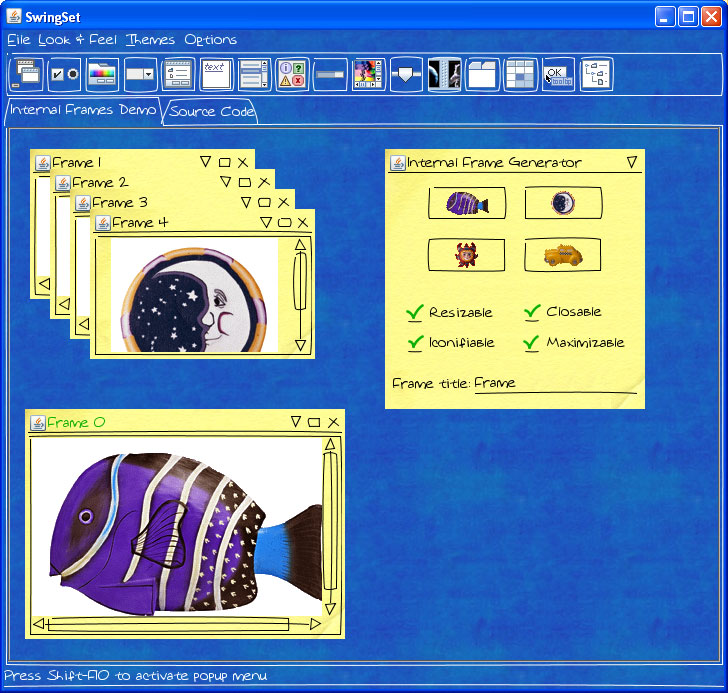
Ok, maybe there is some validity here. Maybe we want the napkin look and feel for a fun looking Image Browser. SWTSwing gives us this by considering Swing A native widget that SWT wraps. In the same way SWT wraps GTK+, Motif, Win32, etc... so everyone who uses these platforms are happy. Now SWTSwing wraps Swing.

Now I can continue advocating SWT, but if I really want it to look like a Java App, it can!

Tuesday, August 15, 2006

SWT-- In podcast form

The latest Java Posse Podcast (http://javaposse.com) (episode #75) is an interview with Steve Northover (http://inside-swt.blogspot.com/) of the SWT team. This is a very worthwhile interview to listen too. There in nothing new or groundbreaking about SWT announced, but Steve gives some very practical advice about software development and GUI toolkits.

As well, anyone who thinks there is an SWT vs. Swing war going on should really hear what Steve has to say.

Saturday, July 22, 2006

Can we learn anything new from Swing?

I have done something that all developers should be cautious of; I found one technology I really liked and settled without tracking the competition. The technology I am referring to is SWT! A few years ago I stumbled upon SWT and I haven't looked back since. SWT was faster than Swing, felt better than Swing and of course, my Java apps finally stopped looking like "Java Apps". For years I was happy, I told everyone how much better SWT was than Swing, and I wondered why the whole world hadn't switched over.

Recently I started listening to a few of the Java Posse's Podcasts. The Podcast consists of 4 guys talking about New and Noteworthy things regarding Java. They don't seem to have much experience with Eclipse, although their general Java knowledge seems pretty good. N.B: They are definitely Swing Guys! After listening to their Podcast about Swing Labs I thought I should check it out. It looks like Swing has come a long way in the past 4 years, and the Swing developers credit some of the success to the arrival of SWT. They have claimed that SWT gave them a kick in the rear. They even claim in the SWT vs. Swing battle, Swing has won... I wouldn't go that far!

I don't understand why anyone would want something that almost looks like "Real Widgets!". That is like saying I like my floor because it "Almost looks like Hardwood!" The quote I enjoy most is, "On Windows, Swing looks like windows, and on Linux it looks like Linux..." Looks like Linux!!! What on earth does that mean? Including myself, we have 4 heavy Linux users in our lab, and we all have different Themes, Colours, and Fonts... What does a Linux Button look like?

But when it comes to Emulated (Non-Native) Widgets, Swing may have stumbled upon something. Swing Labs are a group of developers who are writing "Sexy" Swing apps to show the power of Swing. As they develop these applications, new widgets are componentized and they eventually make their way back into the SDK. I was wondering if something like this would be useful for SWT. I am aware of the Nebula project; however, the widgets here still seem to have a business focus. Also, this project is focused on the creation of widgets, not demonstrating their uses through new “toys”. I am primarily talking about applications and widgets for the average home user.

Don't get me wrong, I think native widgets are very important and most applications should be using these. However, for the next Funky I.M. application, Map Viewer, Media Player, Image Browser, Video Game, etc... Fancy looking, Drop Shadowy, Web 2.0ish User Interfaces can have a huge impact. If you don't believe me, just look at the number of skins people have created for WinAMP / XMMS. I personally don't like the look of iTunes, but many people do. It is this type of customization which is very difficult in SWT and it may be something to consider as we move forward.

Does anyone have any thoughts (without getting into the age old SWT vs. Swing battle).